-
Spring Cloud #1 Gateway 구현Spring Cloud 2022. 4. 19. 15:24
스프링 클라우드 Gateway를 통해
localhost:7090 으로 들어온 요청을 localhost:8080, localhost:8081로 이어지게 하는 실습을 해보았다.
Gateway
- build.gradle
여기서 중요한 것은 dependency인데,
그 중에서도, implementation("org.springframework.cloud:spring-cloud-starter-gateway")를 적어주어야 Spring Cloud가 작동한다. ( actuator는 스프링부트 어플리케이션을 모니터링하는 용도이다.)그리고, 아래에 dependencyManagement 역시 작성해주어야 한다.
plugins {
    id("org.springframework.boot") version "2.4.3"
    id("io.spring.dependency-management") version "1.0.11.RELEASE"
    id 'java'
}

group 'org.example'
version '1.0-SNAPSHOT'

configurations {
    compileOnly {
        extendsFrom annotationProcessor
    }
}

repositories {
    mavenCentral()
}

dependencies {
    implementation("org.springframework.cloud:spring-cloud-starter-gateway")
    implementation("org.springframework.boot:spring-boot-starter-actuator")
}

dependencyManagement {
    imports {
        mavenBom ("org.springframework.cloud:spring-cloud-dependencies:2020.0.1")
    }
}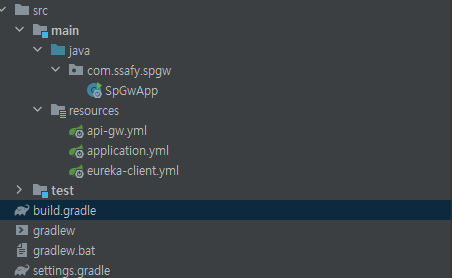
그리고 프로젝트는 다음과 같이 구성되는데, application.yml부터 보겠다.
- application.yml
게이트웨이 서버의 포트를 7090으로 정해주었으며
어플리케이션 이름은 api-gw,
gateway 정보들은 api-gw.yml, eureka-client.yml에 작성한다.
server.port: 7090 spring.application: name: api-gw spring.config.import: api-gw.yml,eureka-client.yml- api-gw.yml
spring.cloud.gateway.routes 에서 매핑해 줄 경로들을 설정해준다.
spring.cloud: gateway: httpclient: connect-timeout: 500 response-timeout: 1000 routes: - id: customer-service #dest uri: http://localhost:8080 predicates: - Path=/v1.0/contents/** - id: purchase-service uri: http://localhost:8081 predicates: - Path=/v1.0/purchase/**- eureka-client.yml
유레카 관련 설정인 듯 한데, 이번 실습과는 무관하다,
eureka:
  instance:
    leaseRenewalIntervalInSeconds: 1
    leaseExpirationDurationInSeconds: 2
  client:
    serviceUrl:d
      defaultZone: http://localhost:8761/eureka/

management:
  endpoints:
  web:
    exposure:
      include: "*"
way1
- CustomerApp이라고 이름지었다.
특별할 것 없이 컨트롤러만 하나 만들어주고, 8080 포트를 지정해준다(자동)
@RestController
public class TestController {

    @GetMapping("/v1.0/contents/test")
    public String test(){
        return "gateway ok";
    }
}
way2
- PurchaseApp이라고 이름지었다.
포트만 8081로 지정해주었다.
@RestController
public class PurchaseController {
    @GetMapping("/v1.0/purchase/test")
    public String test(){
        return "2gateway ok";
    }
}
결과
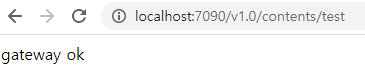
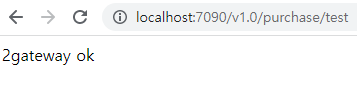
그러면 다음과 같이 7090포트로 요청해도 8080포트의 서버로 이어진다
'Spring Cloud' 카테고리의 다른 글
Spring Cloud #5 FeignClient (0) 2022.05.02 Spring Cloud #3 RabbitMQ (0) 2022.04.25 Spring Cloud #2 Eureka (0) 2022.04.20